We've added three new beta features that let Claude discover, learn, and execute tools dynamically. Here's how they work.
我们新增了三项 Beta 功能,使 Claude 能够动态地发现、学习并执行工具。以下是它们的工作原理。
The future of AI agents is one where models work seamlessly across hundreds or thousands of tools. An IDE assistant that integrates git operations, file manipulation, package managers, testing frameworks, and deployment pipelines. An operations coordinator that connects Slack, GitHub, Google Drive, Jira, company databases, and dozens of MCP servers simultaneously.
AI 智能体的未来在于模型能够无缝地协同成百上千种工具工作。例如,一个集成 Git 操作、文件处理、包管理器、测试框架和部署流水线的 IDE 助手;又如一个同时连接 Slack、GitHub、Google Drive、Jira、公司数据库以及数十个 MCP 服务器的运维协调员。
To build effective agents, they need to work with unlimited tool libraries without stuffing every definition into context upfront. Our blog article on using code execution with MCP discussed how tool results and definitions can sometimes consume 50,000+ tokens before an agent reads a request. Agents should discover and load tools on-demand, keeping only what's relevant for the current task.
要构建高效的智能体,就必须让它们能够使用无限扩展的工具库,而无需在一开始就将所有工具定义塞入上下文。我们在一篇关于结合代码执行与 MCP 的博客文章中提到,工具的结果和定义有时会在智能体读取用户请求之前就消耗超过 50,000 个 token。理想的智能体应当按需发现并加载工具,仅保留当前任务所需的相关内容。
Agents also need the ability to call tools from code. When using natural language tool calling, each invocation requires a full inference pass, and intermediate results pile up in context whether they're useful or not. Code is a natural fit for orchestration logic, such as loops, conditionals, and data transformations. Agents need the flexibility to choose between code execution and inference based on the task at hand.
此外,智能体还需要具备从代码中调用工具的能力。使用自然语言进行工具调用时,每次调用都需要一次完整的推理过程,而中间结果无论是否有用都会堆积在上下文中。相比之下,代码天然适合用于编排逻辑,比如循环、条件判断和数据转换。因此,智能体应能根据具体任务灵活选择使用代码执行还是模型推理。
Agents also need to learn correct tool usage from examples, not just schema definitions. JSON schemas define what's structurally valid, but can't express usage patterns: when to include optional parameters, which combinations make sense, or what conventions your API expects.
智能体还应能通过示例学习正确的工具使用方式,而不仅仅依赖于模式(schema)定义。JSON 模式只能规定结构上的合法性,却无法表达实际使用模式:例如何时应包含可选参数、哪些参数组合是合理的,或者你的 API 遵循何种约定。
Today, we're releasing three features that make this possible:
Tool Search Tool, which allows Claude to use search tools to access thousands of tools without consuming its context window
Programmatic Tool Calling, which allows Claude to invoke tools in a code execution environment reducing the impact on the model’s context window
Tool Use Examples, which provides a universal standard for demonstrating how to effectively use a given tool
今天,我们发布了三项让上述能力成为可能的新功能:
Tool Search Tool:允许 Claude 通过搜索工具访问数千种工具,而不会占用其上下文窗口;
Programmatic Tool Calling:允许 Claude 在代码执行环境中调用工具,从而减少对模型上下文窗口的占用;
Tool Use Examples:提供了一种通用标准,用于展示如何高效地使用特定工具。
In internal testing, we’ve found these features have helped us build things that wouldn’t have been possible with conventional tool use patterns. For example, Claude for Excel uses Programmatic Tool Calling to read and modify spreadsheets with thousands of rows without overloading the model’s context window.
在内部测试中,我们发现这些功能让我们得以构建出以往采用传统工具使用模式无法实现的产品。例如,“Claude for Excel”就利用程序化工具调用功能,在不超出模型上下文限制的前提下读取和修改包含数千行数据的电子表格。
Based on our experience, we believe these features open up new possibilities for what you can build with Claude.
基于实践经验,我们相信这些新功能将为你使用 Claude 构建应用开启全新的可能性。
Tool Search Tool
The challenge(面临的挑战)
MCP tool definitions provide important context, but as more servers connect, those tokens can add up. Consider a five-server setup:
GitHub: 35 tools (~26K tokens)
Slack: 11 tools (~21K tokens)
Sentry: 5 tools (~3K tokens)
Grafana: 5 tools (~3K tokens)
Splunk: 2 tools (~2K tokens)
MCP 工具定义提供了重要的上下文信息,但随着接入的服务器数量增加,这些定义所占用的 token 也会迅速累积。以一个包含五个服务配置的项目为例:
GitHub:35 个工具(约 26K tokens)
Slack:11 个工具(约 21K tokens)
Sentry:5 个工具(约 3K tokens)
Grafana:5 个工具(约 3K tokens)
Splunk:2 个工具(约 2K tokens)
That's 58 tools consuming approximately 55K tokens before the conversation even starts. Add more servers like Jira (which alone uses ~17K tokens) and you're quickly approaching 100K+ token overhead. At Anthropic, we've seen tool definitions consume 134K tokens before optimization.
在对话尚未开始之前,这 58 个工具就已消耗了大约 5.5万 tokens。如果再加入 Jira 等更多服务器(仅 Jira 一项就需约 1.7万 tokens),token 开销很快就会突破 10万。在 Anthropic 内部,我们曾观察到未经优化的工具定义在初始化阶段就消耗了高达 13.4万 tokens。
But token cost isn't the only issue. The most common failures are wrong tool selection and incorrect parameters, especially when tools have similar names like notification-send-user vs. notification-send-channel.
然而,token 消耗并非唯一问题。最常见的失败情形是选错工具或参数使用错误,尤其是在工具名称相似的情况下,例如 notification-send-user 与 notification-send-channel。
Our solution(解决方案)
Instead of loading all tool definitions upfront, the Tool Search Tool discovers tools on-demand. Claude only sees the tools it actually needs for the current task.
工具搜索工具不再预先加载所有工具定义,而是按需动态发现所需工具。Claude 仅会看到当前任务实际需要的那些工具。
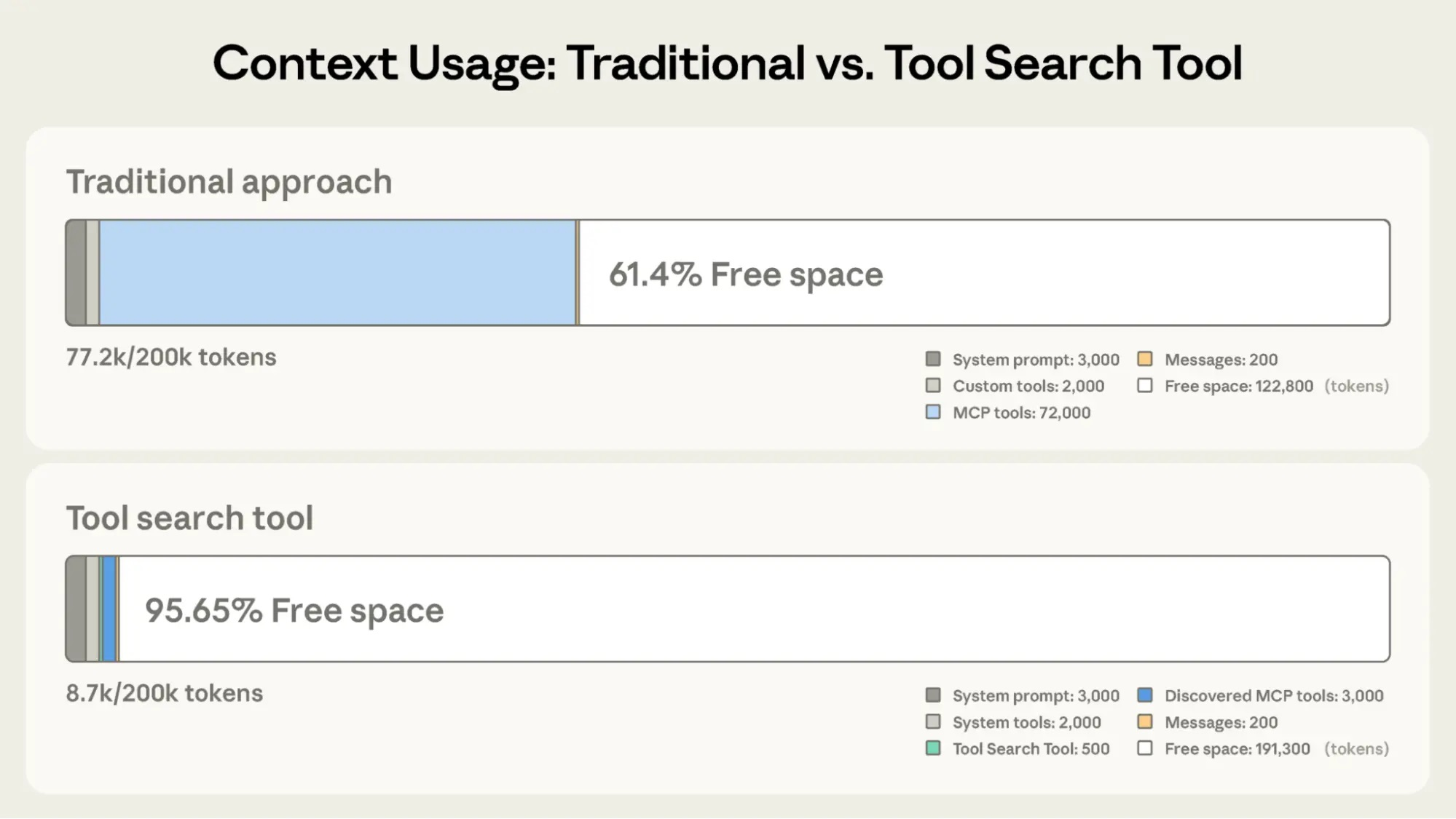
Tool Search Tool preserves 191,300 tokens of context compared to 122,800 with Claude’s traditional approach.
与 Claude 传统方法相比,工具搜索工具可节省 191,300 个 token 的上下文空间(传统方法为 122,800)
Traditional approach:
All tool definitions loaded upfront (~72K tokens for 50+ MCP tools)
Conversation history and system prompt compete for remaining space
Total context consumption: ~77K tokens before any work begins
传统方法:
所有工具定义在初始阶段即全部加载(50 多个 MCP 工具约需 72K tokens)
对话历史和系统提示需与工具定义竞争剩余上下文空间
在执行任何实际工作前,总上下文消耗已达约 77K tokens
With the Tool Search Tool:
Only the Tool Search Tool loaded upfront (~500 tokens)
Tools discovered on-demand as needed (3-5 relevant tools, ~3K tokens)
Total context consumption: ~8.7K tokens, preserving 95% of context window
使用工具搜索工具后:
初始仅加载工具搜索工具本身(约 500 tokens)
工具按需发现(每次仅加载 3–5 个相关工具,约 3K tokens)
总上下文消耗降至约 8.7K tokens,保留了 95% 的上下文窗口
This represents an 85% reduction in token usage while maintaining access to your full tool library. Internal testing showed significant accuracy improvements on MCP evaluations when working with large tool libraries. Opus 4 improved from 49% to 74%, and Opus 4.5 improved from 79.5% to 88.1% with Tool Search Tool enabled.
这相当于在保持对完整工具库访问能力的同时,将 token 使用量减少了 85%。内部测试表明,在处理大型工具库时,启用工具搜索工具显著提升了 MCP 评估中的准确率:Opus 4 的准确率从 49% 提升至 74%,Opus 4.5 则从 79.5% 提升至 88.1%。
How the Tool Search Tool works(工作原理)
The Tool Search Tool lets Claude dynamically discover tools instead of loading all definitions upfront. You provide all your tool definitions to the API, but mark tools with defer_loading: true to make them discoverable on-demand. Deferred tools aren't loaded into Claude's context initially. Claude only sees the Tool Search Tool itself plus any tools with defer_loading: false (your most critical, frequently-used tools).
工具搜索工具使 Claude 能够动态发现工具,而非在一开始就加载所有定义。您将所有工具定义提供给 API,但通过设置 defer_loading: true 标记,使这些工具支持按需发现。被标记为延迟加载的工具不会在初始阶段载入 Claude 的上下文;Claude 最初仅能看到工具搜索工具本身,以及那些 defer_loading: false 的工具(即您最关键、最常用的工具)。
When Claude needs specific capabilities, it searches for relevant tools. The Tool Search Tool returns references to matching tools, which get expanded into full definitions in Claude's context.
当 Claude 需要特定功能时,它会主动搜索相关工具。工具搜索工具会返回匹配工具的引用,这些引用随后会在 Claude 的上下文中展开为完整的工具定义。
For example, if Claude needs to interact with GitHub, it searches for "github," and only github.createPullRequest and github.listIssues get loaded—not your other 50+ tools from Slack, Jira, and Google Drive.
例如,若 Claude 需要与 GitHub 交互,它会搜索 “github”,此时仅 github.createPullRequest 和 github.listIssues 会被加载——而不会同时加载来自 Slack、Jira 和 Google Drive 的其他 50 多个工具。
This way, Claude has access to your full tool library while only paying the token cost for tools it actually needs.
通过这种方式,Claude 可以访问您的完整工具库,却只需为实际使用的工具支付 token 成本。
Prompt caching note: Tool Search Tool doesn't break prompt caching because deferred tools are excluded from the initial prompt entirely. They're only added to context after Claude searches for them, so your system prompt and core tool definitions remain cacheable.
关于提示词缓存(Prompt Caching)的说明:
工具搜索工具不会破坏提示词缓存机制,因为延迟加载的工具完全不会出现在初始提示词中。它们仅在 Claude 发起搜索后才被添加到上下文,因此您的系统提示和核心工具定义仍可被有效缓存。
Implementation:
{
  "tools": [
    // Include a tool search tool (regex, BM25, or custom)
    {"type": "tool_search_tool_regex_20251119", "name": "tool_search_tool_regex"},

    // Mark tools for on-demand discovery
    {
      "name": "github.createPullRequest",
      "description": "Create a pull request",
      "input_schema": {...},
      "defer_loading": true
    }
    // ... hundreds more deferred tools with defer_loading: true
  ]
}
For MCP servers, you can defer loading entire servers while keeping specific high-use tools loaded:
对于 MCP 服务器,您可以选择对整个服务器启用延迟加载,同时保留某些高频使用工具的即时加载:
{
  "type": "mcp_toolset",
  "mcp_server_name": "google-drive",
  "default_config": {"defer_loading": true}, # defer loading the entire server
  "configs": {
    "search_files": {
"defer_loading": false
    }  // Keep most used tool loaded
  }
}
The Claude Developer Platform provides regex-based and BM25-based search tools out of the box, but you can also implement custom search tools using embeddings or other strategies.
Claude 开发者平台开箱即用地提供了基于正则表达式(regex-based)和 BM25 算法的搜索工具,但您也可以通过嵌入(embeddings)或其他策略实现自定义的搜索工具。
When to use the Tool Search Tool(何时使用工具搜索工具)
Like any architectural decision, enabling the Tool Search Tool involves trade-offs. The feature adds a search step before tool invocation, so it delivers the best ROI when the context savings and accuracy improvements outweigh additional latency.
与任何架构决策一样,启用工具搜索工具涉及权衡取舍。该功能在调用工具前增加了一个搜索步骤,因此只有当上下文节省量和准确率提升所带来的收益超过额外延迟成本时,才能实现最佳投资回报(ROI)。
Use it when:
Tool definitions consuming >10K tokens
Experiencing tool selection accuracy issues
Building MCP-powered systems with multiple servers
10+ tools available
建议在以下情况下使用:
工具定义占用超过 10K tokens
遇到工具选择准确率问题
构建基于 MCP、连接多个服务器的系统
可用工具数量超过 10 个
Less beneficial when:
Small tool library (<10 tools)
All tools used frequently in every session
Tool definitions are compact
在以下情况下收益较低:
工具库规模较小(少于 10 个工具)
每次会话中所有工具都被频繁使用
工具定义本身非常紧凑
Programmatic Tool Calling
The challenge(面临的挑战)
Traditional tool calling creates two fundamental problems as workflows become more complex:
Context pollution from intermediate results: When Claude analyzes a 10MB log file for error patterns, the entire file enters its context window, even though Claude only needs a summary of error frequencies. When fetching customer data across multiple tables, every record accumulates in context regardless of relevance. These intermediate results consume massive token budgets and can push important information out of the context window entirely.
Inference overhead and manual synthesis: Each tool call requires a full model inference pass. After receiving results, Claude must "eyeball" the data to extract relevant information, reason about how pieces fit together, and decide what to do next—all through natural language processing. A five tool workflow means five inference passes plus Claude parsing each result, comparing values, and synthesizing conclusions. This is both slow and error-prone.
随着工作流变得愈加复杂,传统的工具调用方式会引发两个根本性问题:
中间结果导致上下文污染:当 Claude 分析一个 10MB 的日志文件以查找错误模式时,整个文件都会进入其上下文窗口,尽管它实际上只需要一份错误频率的摘要。在跨多个数据表获取客户信息时,无论相关与否,每条记录都会累积在上下文中。这些中间结果会消耗大量 token 预算,甚至可能将关键信息完全挤出上下文窗口。
推理开销与手动合成:每次工具调用都需要一次完整的模型推理过程。收到结果后,Claude 必须通过自然语言处理“目视”检查数据、提取相关信息、推理各部分如何关联,并决定下一步操作。一个包含五个工具的工作流意味着五次推理调用,外加 Claude 对每个结果进行解析、数值比对和结论整合。这种方式不仅速度慢,而且容易出错
Our solution(解决方案)
Programmatic Tool Calling enables Claude to orchestrate tools through code rather than through individual API round-trips. Instead of Claude requesting tools one at a time with each result being returned to its context, Claude writes code that calls multiple tools, processes their outputs, and controls what information actually enters its context window.
程序化工具调用使 Claude 能够通过代码编排工具,而非依赖逐个 API 调用。Claude 不再逐次请求工具并将每个结果返回至其上下文,而是编写一段代码,由该代码统一调用多个工具、处理输出结果,并精确控制哪些信息真正进入其上下文窗口。
Claude excels at writing code and by letting it express orchestration logic in Python rather than through natural language tool invocations, you get more reliable, precise control flow. Loops, conditionals, data transformations, and error handling are all explicit in code rather than implicit in Claude's reasoning.
Claude 擅长编写代码。通过允许它使用 Python 表达编排逻辑,而非通过自然语言发起工具调用,您将获得更可靠、更精确的控制流。循环、条件判断、数据转换和错误处理等逻辑在代码中显式表达,而非隐含于 Claude 的推理过程中。
Example: Budget compliance check(示例:预算合规性检查)
Consider a common business task: "Which team members exceeded their Q3 travel budget?"
考虑一个常见的业务任务:“哪些团队成员超出了第三季度的差旅预算?”
You have three tools available:
get_team_members(department) - Returns team member list with IDs and levels
get_expenses(user_id, quarter) - Returns expense line items for a user
get_budget_by_level(level) - Returns budget limits for an employee level
您拥有以下三个工具:
get_team_members(department):返回指定部门的团队成员列表,包含 ID 和职级
get_expenses(user_id, quarter):返回某用户在指定季度的费用明细
get_budget_by_level(level):返回某职级员工的预算限额
Traditional approach:
Fetch team members → 20 people
For each person, fetch their Q3 expenses → 20 tool calls, each returning 50-100 line items (flights, hotels, meals, receipts)
Fetch budget limits by employee level
All of this enters Claude's context: 2,000+ expense line items (50 KB+)
Claude manually sums each person's expenses, looks up their budget, compares expenses against budget limits
More round-trips to the model, significant context consumption
传统方法:
获取团队成员 → 20 人
为每人分别获取 Q3 费用 → 20 次工具调用,每次返回 50–100 条费用明细(航班、酒店、餐饮、收据等)
根据员工职级获取预算限额
With Programmatic Tool Calling:
Instead of each tool result returning to Claude, Claude writes a Python script that orchestrates the entire workflow. The script runs in the Code Execution tool (a sandboxed environment), pausing when it needs results from your tools. When you return tool results via the API, they're processed by the script rather than consumed by the model. The script continues executing, and Claude only sees the final output.
所有这些数据都会进入 Claude 的上下文:超过 2,000 条费用明细(占用 50KB 以上),Claude 需手动汇总每个人的支出、查询对应预算,并逐一比较是否超支; 更多模型调用轮次,显著的上下文消耗
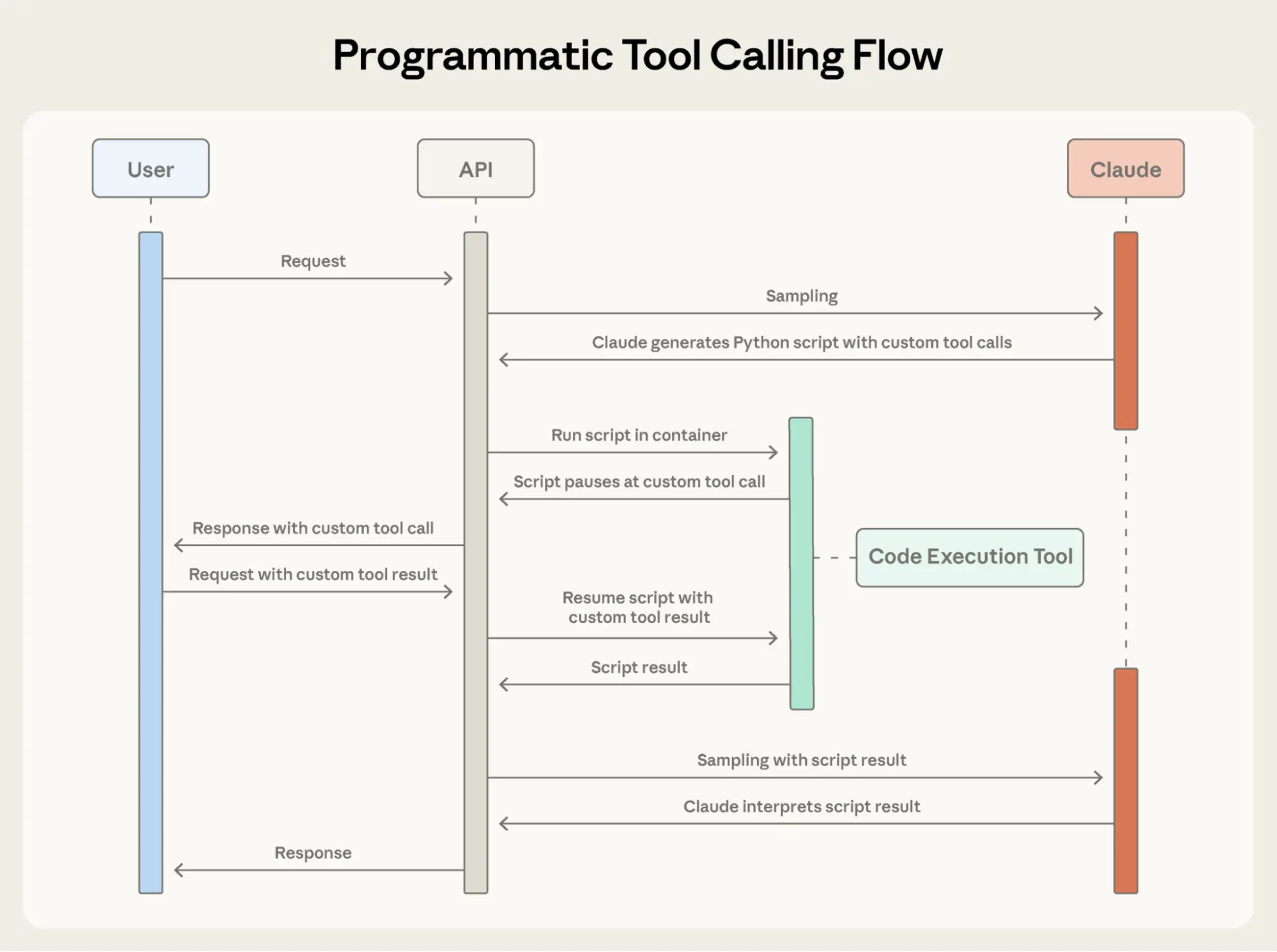
Programmatic Tool Calling enables Claude to orchestrate tools through code rather than through individual API round-trips, allowing for parallel tool execution.
程序化工具调用使 Claude 能够通过代码编排工具,而非依赖逐个 API 调用,从而支持并行执行多个工具。
Here's what Claude's orchestration code looks like for the budget compliance task:
以下是 Claude 为预算合规性任务生成的编排代码示例:
# Fetch budgets for each unique level
levels = list(set(m["level"] for m in team))
budget_results = await asyncio.gather(*[
    get_budget_by_level(level) for level in levels
])

# Create a lookup dictionary: {"junior": budget1, "senior": budget2, ...}
budgets = {level: budget for level, budget in zip(levels, budget_results)}
# Fetch all expenses in parallel
expenses = await asyncio.gather(*[
    get_expenses(m["id"], "Q3") for m in team
])
# Find employees who exceeded their travel budget
exceeded = []
for member, exp in zip(team, expenses):
    budget = budgets[member["level"]]
    total = sum(e["amount"] for e in exp)
    if total > budget["travel_limit"]:
        exceeded.append({
            "name": member["name"],
            "spent": total,
            "limit": budget["travel_limit"]
        })

print(json.dumps(exceeded))
Claude's context receives only the final result: the two to three people who exceeded their budget. The 2,000+ line items, the intermediate sums, and the budget lookups do not affect Claude’s context, reducing consumption from 200KB of raw expense data to just 1KB of results.
Claude 的上下文仅接收到最终结果:两到三位超出预算的人员。超过 2,000 条的费用明细、中间汇总数据以及预算查询过程均不会进入 Claude 的上下文,从而将原始费用数据的上下文占用从 200KB 大幅缩减至仅 1KB 的结果。
The efficiency gains are substantial:
Token savings: By keeping intermediate results out of Claude's context, PTC dramatically reduces token consumption. Average usage dropped from 43,588 to 27,297 tokens, a 37% reduction on complex research tasks.
Reduced latency: Each API round-trip requires model inference (hundreds of milliseconds to seconds). When Claude orchestrates 20+ tool calls in a single code block, you eliminate 19+ inference passes. The API handles tool execution without returning to the model each time.
Improved accuracy: By writing explicit orchestration logic, Claude makes fewer errors than when juggling multiple tool results in natural language. Internal knowledge retrieval improved from 25.6% to 28.5%; GIA benchmarks from 46.5% to 51.2%.
这种效率提升十分显著:
Token 节省: 通过将中间结果排除在 Claude 上下文之外,程序化工具调用(PTC)大幅降低了 token 消耗。在复杂的调研任务中,平均使用量从 43,588 tokens 降至 27,297 tokens,减少了 37%。
延迟降低: 每次 API 调用都需要一次模型推理(耗时数百毫秒至数秒)。当 Claude 在单段代码块中编排 20 多次工具调用时,可避免多达 19 次以上的额外推理。API 直接处理工具执行,无需每次都返回模型。
准确率提升: 通过编写显式的编排逻辑,Claude 比在自然语言中同时处理多个工具结果时犯错更少。内部知识检索准确率从 25.6% 提升至 28.5%;GIA 基准测试得分从 46.5% 提高到 51.2%。
Production workflows involve messy data, conditional logic, and operations that need to scale. Programmatic Tool Calling lets Claude handle that complexity programmatically while keeping its focus on actionable results rather than raw data processing.
实际生产工作流通常涉及杂乱的数据、复杂的条件逻辑以及需要扩展的操作。程序化工具调用让 Claude 能以编程方式处理这些复杂性,同时将注意力集中在可操作的结果上,而非原始数据处理本身。
How Programmatic Tool Calling works(工作原理)
Mark tools as callable from code(工具标记为可从代码调用)
Add code_execution to tools, and set allowed_callers to opt-in tools for programmatic execution:
在工具定义中添加 code_execution 字段,并通过设置 allowed_callers 来选择启用程序化调用的工具:
{
  "tools": [
    {
      "type": "code_execution_20250825",
      "name": "code_execution"
    },
    {
      "name": "get_team_members",
      "description": "Get all members of a department...",
      "input_schema": {...},
      "allowed_callers": ["code_execution_20250825"] # opt-in to programmatic tool calling
    },
    {
      "name": "get_expenses",
      ...
    },
    {
      "name": "get_budget_by_level",
       ...
    }
  ]
}
The API converts these tool definitions into Python functions that Claude can call.
API 会将这些工具定义自动转换为 Claude 可调用的 Python 函数。
Claude writes orchestration code(Claude 编写编排代码)
Instead of requesting tools one at a time, Claude generates Python code:
Claude 不再逐个请求工具,而是生成一段 Python 代码:
{
  "type": "server_tool_use",
  "id": "srvtoolu_abc",
  "name": "code_execution",
  "input": {
    "code": "team = get_team_members('engineering')\n..." # the code example above
  }
}
Tools execute without hitting Claude's context(工具执行不占用 Claude 的上下文)
When the code calls get_expenses(), you receive a tool request with a caller field:
当代码调用 get_expenses() 时,您会收到一个包含 caller 字段的工具请求:
{
  "type": "tool_use",
  "id": "toolu_xyz",
  "name": "get_expenses",
  "input": {"user_id": "emp_123", "quarter": "Q3"},
  "caller": {
    "type": "code_execution_20250825",
    "tool_id": "srvtoolu_abc"
  }
}
You provide the result, which is processed in the Code Execution environment rather than Claude's context. This request-response cycle repeats for each tool call in the code.
您提供结果后,该结果将在代码执行环境中被处理,而不会进入 Claude 的上下文。此请求-响应循环会在代码中的每次工具调用时重复进行。
Only final output enters context(仅最终输出进入上下文)
When the code finishes running, only the results of the code are returned to Claude:
当代码执行完毕后,只有代码的最终输出结果会返回给 Claude:
{
  "type": "code_execution_tool_result",
  "tool_use_id": "srvtoolu_abc",
  "content": {
    "stdout": "[{\"name\": \"Alice\", \"spent\": 12500, \"limit\": 10000}...]"
  }
}
This is all Claude sees, not the 2000+ expense line items processed along the way.
这便是 Claude 所看到的全部内容——而非处理过程中涉及的 2,000 多条费用明细。
When to use Programmatic Tool Calling(何时使用程序化工具调用)
Programmatic Tool Calling adds a code execution step to your workflow. This extra overhead pays off when the token savings, latency improvements, and accuracy gains are substantial.
程序化工具调用为您的工作流增加了一个代码执行步骤。当 token 节省、延迟降低和准确率提升带来的收益足够显著时,这一额外开销是值得的。
Most beneficial when:
Processing large datasets where you only need aggregates or summaries
Running multi-step workflows with three or more dependent tool calls
Filtering, sorting, or transforming tool results before Claude sees them
Handling tasks where intermediate data shouldn't influence Claude's reasoning
Running parallel operations across many items (checking 50 endpoints, for example)
最适合以下场景:
处理大型数据集,但仅需聚合结果或摘要
执行包含三个及以上依赖关系的多步骤工作流
在 Claude 接收前对工具结果进行过滤、排序或转换
处理中间数据不应影响 Claude 推理的任务
对大量项目并行执行操作(例如检查 50 个端点)
Less beneficial when:
Making simple single-tool invocations
Working on tasks where Claude should see and reason about all intermediate results
Running quick lookups with small responses
在以下场景中收益较低:
简单的单工具调用
需要 Claude 查看并推理所有中间结果的任务
返回结果较小的快速查询操作
Tool Use Examples
The challenge(面临的挑战)
JSON Schema excels at defining structure–types, required fields, allowed enums–but it can't express usage patterns: when to include optional parameters, which combinations make sense, or what conventions your API expects.
JSON Schema 擅长定义结构——如数据类型、必填字段、允许的枚举值等,但它无法表达实际使用模式:何时应包含可选参数、哪些参数组合是合理的,或您的 API 遵循何种约定。
Consider a support ticket API:
以一个工单支持 API 为例:
{
  "name": "create_ticket",
  "input_schema": {
    "properties": {
      "title": {"type": "string"},
      "priority": {"enum": ["low", "medium", "high", "critical"]},
      "labels": {"type": "array", "items": {"type": "string"}},
      "reporter": {
        "type": "object",
        "properties": {
          "id": {"type": "string"},
          "name": {"type": "string"},
          "contact": {
            "type": "object",
            "properties": {
              "email": {"type": "string"},
              "phone": {"type": "string"}
            }
          }
        }
      },
      "due_date": {"type": "string"},
      "escalation": {
        "type": "object",
        "properties": {
          "level": {"type": "integer"},
          "notify_manager": {"type": "boolean"},
          "sla_hours": {"type": "integer"}
        }
      }
    },
    "required": ["title"]
  }
}
The schema defines what's valid, but leaves critical questions unanswered:
Format ambiguity: Should due_date use "2024-11-06", "Nov 6, 2024", or "2024-11-06T00:00:00Z"?
ID conventions: Is reporter.id a UUID, "USR-12345", or just "12345"?
Nested structure usage: When should Claude populate reporter.contact?
Parameter correlations: How do escalation.level and escalation.sla_hours relate to priority?
Schema 定义了什么是合法的,却留下了一些关键问题未解答:
格式模糊性:due_date 应使用 "2024-11-06"、"Nov 6, 2024" 还是 "2024-11-06T00:00:00Z"?
ID 约定:reporter.id 是 UUID、"USR-12345",还是仅 "12345"?
嵌套结构用法:Claude 何时应填充 reporter.contact?
参数关联性:escalation.level 与 escalation.sla_hours 如何与 priority 相关联?
These ambiguities can lead to malformed tool calls and inconsistent parameter usage.
这些模糊之处可能导致工具调用格式错误或参数使用不一致。
Our solution(解决方案)
Tool Use Examples let you provide sample tool calls directly in your tool definitions. Instead of relying on schema alone, you show Claude concrete usage patterns:
工具使用示例允许您直接在工具定义中提供示例调用。您不再仅依赖 Schema,而是向 Claude 展示具体的使用模式:
{
    "name": "create_ticket",
    "input_schema": { /* same schema as above */ },
    "input_examples": [
      {
        "title": "Login page returns 500 error",
        "priority": "critical",
        "labels": ["bug", "authentication", "production"],
        "reporter": {
          "id": "USR-12345",
          "name": "Jane Smith",
          "contact": {
            "email": "jane@acme.com",
            "phone": "+1-555-0123"
          }
        },
        "due_date": "2024-11-06",
        "escalation": {
          "level": 2,
          "notify_manager": true,
          "sla_hours": 4
        }
      },
      {
        "title": "Add dark mode support",
        "labels": ["feature-request", "ui"],
        "reporter": {
          "id": "USR-67890",
          "name": "Alex Chen"
        }
      },
      {
        "title": "Update API documentation"
      }
    ]
  }
From these three examples, Claude learns:
Format conventions: Dates use YYYY-MM-DD, user IDs follow USR-XXXXX, labels use kebab-case
Nested structure patterns: How to construct the reporter object with its nested contact object
Optional parameter correlations: Critical bugs have full contact info + escalation with tight SLAs; feature requests have reporter but no contact/escalation; internal tasks have title only
通过这三个示例,Claude 能够学习到:
格式约定:日期使用 YYYY-MM-DD 格式,用户 ID 遵循 USR-XXXXX 模式,标签采用 kebab-case(如 bug-report)
嵌套结构模式:如何构建包含嵌套 contact 对象的 reporter 对象
可选参数的关联逻辑:严重缺陷需提供完整联系信息并配置严格的 SLA 升级;功能请求只需 reporter,无需 contact 或 escalation;内部任务仅需标题
In our own internal testing, tool use examples improved accuracy from 72% to 90% on complex parameter handling.
在我们内部测试中,工具使用示例将复杂参数处理的准确率从 72% 提升至 90%。
When to use Tool Use Examples(何时使用工具使用示例)
Tool Use Examples add tokens to your tool definitions, so they’re most valuable when accuracy improvements outweigh the additional cost.
工具使用示例会增加工具定义的 token 开销,因此最适合在准确率提升显著超过额外成本的场景中使用。
Most beneficial when:
Complex nested structures where valid JSON doesn't imply correct usage
Tools with many optional parameters and inclusion patterns matter
APIs with domain-specific conventions not captured in schemas
Similar tools where examples clarify which one to use (e.g., create_ticket vs create_incident)
最适合以下情况:
具有复杂嵌套结构的工具,其中合法 JSON 并不意味着正确用法
拥有大量可选参数且参数包含模式至关重要的工具
包含 Schema 无法捕获的领域特定约定的 API
名称或功能相似的工具,需通过示例明确区分(例如 create_ticket 与 create_incident)
Less beneficial when:
Simple single-parameter tools with obvious usage
Standard formats like URLs or emails that Claude already understands
Validation concerns better handled by JSON Schema constraints
在以下情况下收益较低:
参数简单、用法显而易见的单参数工具
Claude 已能准确理解的标准格式(如 URL 或电子邮件地址)
更适合通过 JSON Schema 约束解决的验证问题
Best practices(最佳实践)
Building agents that take real-world actions means handling scale, complexity, and precision simultaneously. These three features work together to solve different bottlenecks in tool use workflows. Here's how to combine them effectively.
构建能够执行真实世界操作的智能体,意味着必须同时应对规模、复杂性和精确性。这三项功能协同工作,分别解决工具使用工作流中的不同瓶颈。以下是有效组合它们的方法。
Layer features strategically(战略性地分层使用功能)
Not every agent needs to use all three features for a given task. Start with your biggest bottleneck:
Context bloat from tool definitions → Tool Search Tool
Large intermediate results polluting context → Programmatic Tool Calling
Parameter errors and malformed calls → Tool Use Examples
并非每个智能体在每项任务中都需要同时使用全部三项功能。请从您当前最严重的瓶颈入手:
工具定义导致上下文膨胀 → 使用 工具搜索工具
大量中间结果污染上下文 → 使用 程序化工具调用
参数错误或调用格式不规范 → 使用 工具使用示例
This focused approach lets you address the specific constraint limiting your agent's performance, rather than adding complexity upfront.
这种聚焦策略能让您精准解决限制智能体性能的具体约束,而非过早引入不必要的复杂性。
Then layer additional features as needed. They're complementary: Tool Search Tool ensures the right tools are found, Programmatic Tool Calling ensures efficient execution, and Tool Use Examples ensure correct invocation.
随后根据需要叠加其他功能。它们彼此互补:工具搜索工具确保找到正确的工具,程序化工具调用确保高效执行,工具使用示例确保调用方式正确。
Set up Tool Search Tool for better discovery(优化工具搜索工具以提升发现效果)
Tool search matches against names and descriptions, so clear, descriptive definitions improve discovery accuracy.
工具搜索基于名称和描述进行匹配,因此清晰、具有描述性的定义能显著提高发现准确率。
// Good
{
    "name": "search_customer_orders",
    "description": "Search for customer orders by date range, status, or total amount. Returns order details including items, shipping, and payment info."
}

// Bad
{
    "name": "query_db_orders",
    "description": "Execute order query"
}
Add system prompt guidance so Claude knows what's available:
在系统提示中加入引导,让 Claude 明确可用能力:
#You have access to tools for Slack messaging, Google Drive file management,
Jira ticket tracking, and GitHub repository operations. Use the tool search
to find specific capabilities.
Keep your three to five most-used tools always loaded, defer the rest. This balances immediate access for common operations with on-demand discovery for everything else.
始终加载您最常用的三到五个工具,其余工具设为延迟加载。这样可在常用操作的即时访问与其余工具的按需发现之间取得平衡。
Set up Programmatic Tool Calling for correct execution(配置程序化工具调用以确保正确执行)
Since Claude writes code to parse tool outputs, document return formats clearly. This helps Claude write correct parsing logic:
由于 Claude 会编写代码来解析工具输出,请清晰地记录返回格式。这有助于 Claude 编写正确的解析逻辑:
{
    "name": "get_orders",
    "description": "Retrieve orders for a customer.
Returns:
    List of order objects, each containing:
    - id (str): Order identifier
    - total (float): Order total in USD
    - status (str): One of 'pending', 'shipped', 'delivered'
    - items (list): Array of {sku, quantity, price}
    - created_at (str): ISO 8601 timestamp"
}
See below for opt-in tools that benefit from programmatic orchestration:
Tools that can run in parallel (independent operations)
Operations safe to retry (idempotent)
以下类型的工具特别适合启用程序化编排:
可并行运行的工具(彼此独立的操作)
支持安全重试的操作(幂等操作)
Set up Tool Use Examples for parameter accuracy(配置工具使用示例以提升参数准确性)
Craft examples for behavioral clarity:
Use realistic data (real city names, plausible prices, not "string" or "value")
Show variety with minimal, partial, and full specification patterns
Keep it concise: 1-5 examples per tool
Focus on ambiguity (only add examples where correct usage isn't obvious from schema)
精心设计示例以传达行为意图:
使用真实数据(如真实城市名、合理价格),避免使用 "string" 或 "value" 等占位符
展示多样性:包含最小化、部分填充和完整规格的调用模式
保持简洁:每个工具提供 1–5 个示例即可
聚焦模糊点:仅在 Schema 无法明确正确用法时才添加示例


发表评论 取消回复